How it works
From document to ERP action. Together with your team.
Every AI coworker is configured for a specific process at a specific customer, aligned to your exact way of working and your ERP. Your team stays in control and approves where needed.
How an AI coworker works
Six steps, from intake to confirmation. Every step is transparent and traceable, and when in doubt, your team decides.
Intake & classification
The AI coworker continuously monitors your inbound channels, email inboxes, portals, shared folders, API integrations, webhooks. Every trigger is classified and routed automatically: an incoming order, invoice or service ticket, but also a status change or a notification from an external system.
Data extraction
Relevant data is extracted from every source: PDFs, scans, emails, Excel attachments, API responses, photos of handwritten forms. Order lines, amounts, SKUs, customer references, regardless of format or layout.
Validation against your ERP
Extracted data is validated against the master data in your ERP. Does this customer exist? Is this SKU valid? Does the price match the agreement? We understand the data model of SAP, AFAS, Exact, Dynamics, Odoo and Bouwworks, including the quirks. Missing data is filled in automatically.
Action in your ERP
The AI coworker creates, updates or completes records directly in your ERP. No generic API calls: we work natively with each system's business logic. From sales orders in Exact to invoice postings in AFAS, service tickets in Bouwworks or quotes in Odoo.
Humans and AI working together
Human in the loopYour team stays in control. When in doubt, the AI coworker stops and escalates, with full context and a concrete proposal. No bare error message, but: 'this price is 12% below the contract, here's what I suggest.' You review, approve and decide. The AI coworker learns from every correction and gets better with every interaction.
Confirmation & insight
Depending on the process, the AI coworker sends confirmations to customers, suppliers or internal stakeholders. The full journey, from trigger to action, is visible in real time on the dashboard. Volumes, lead times, exception rates: you see exactly how your AI coworker performs.
The platform
Where humans and AI collaborate
Our platform is not a black box. It's where your team and the AI coworker work together, with full visibility, control and the ability to intervene. Every integration and process template is reusable: a new customer on the same ERP or process goes live faster and at lower cost.
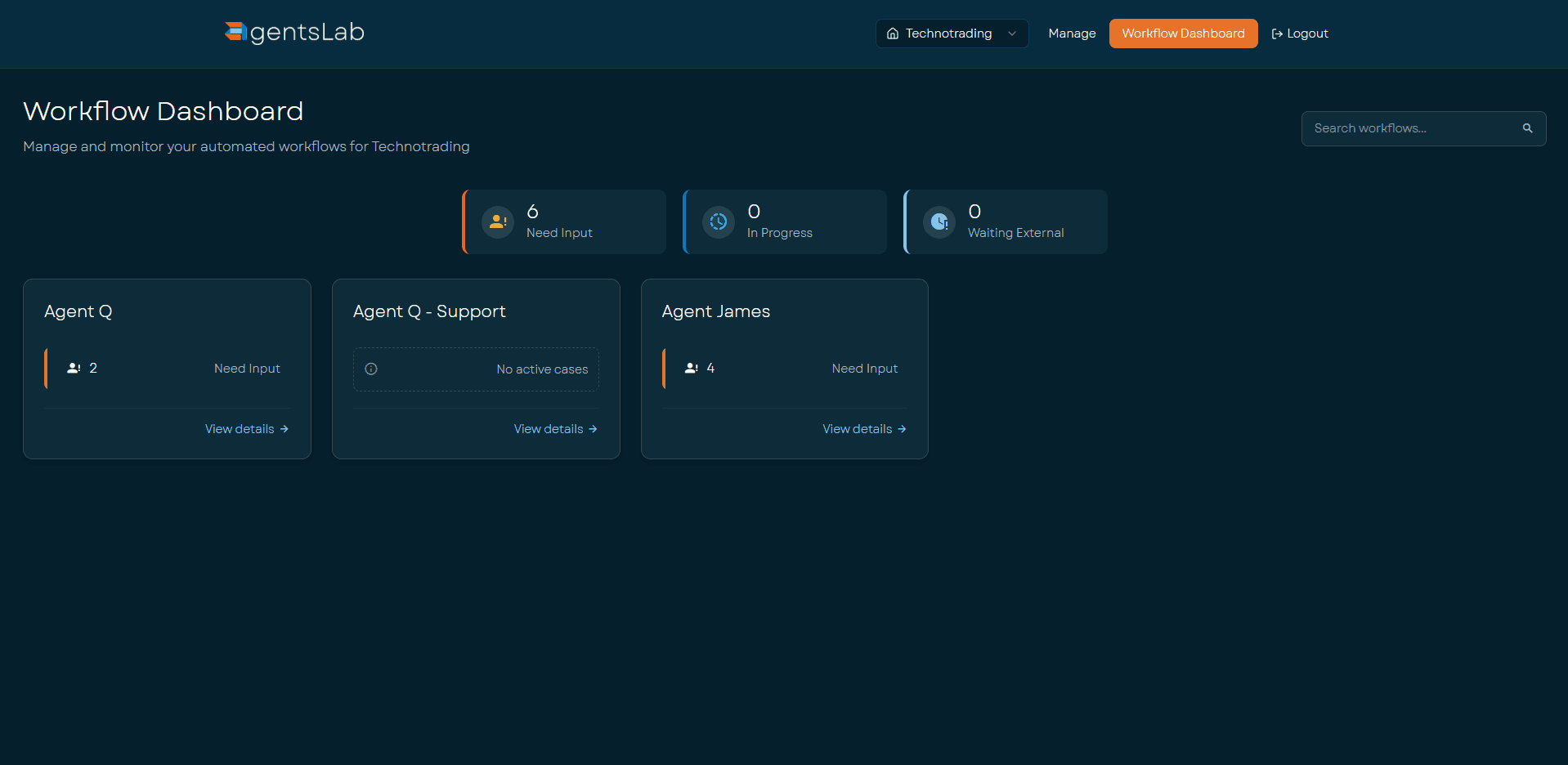
Workflow Dashboard
Managers see at a glance how all AI coworkers are performing: volumes, lead times, exception rates and trends. Tailored to your processes.
Oversight and steering
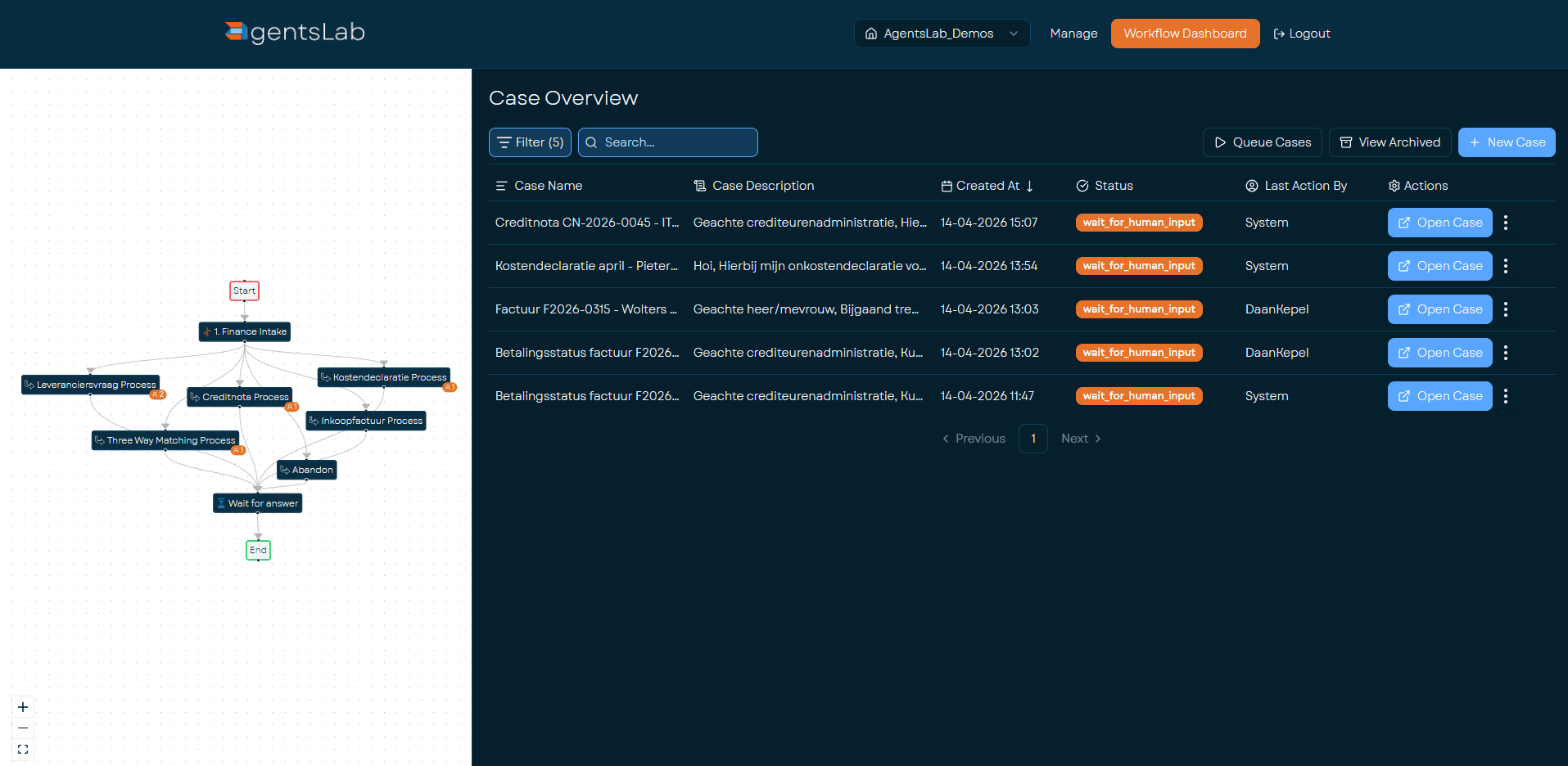
Case Overview
Real-time status of every case in every process. Filter by status, date or type. See immediately which cases need attention and which were handled fully automatically.
Prioritise and monitor
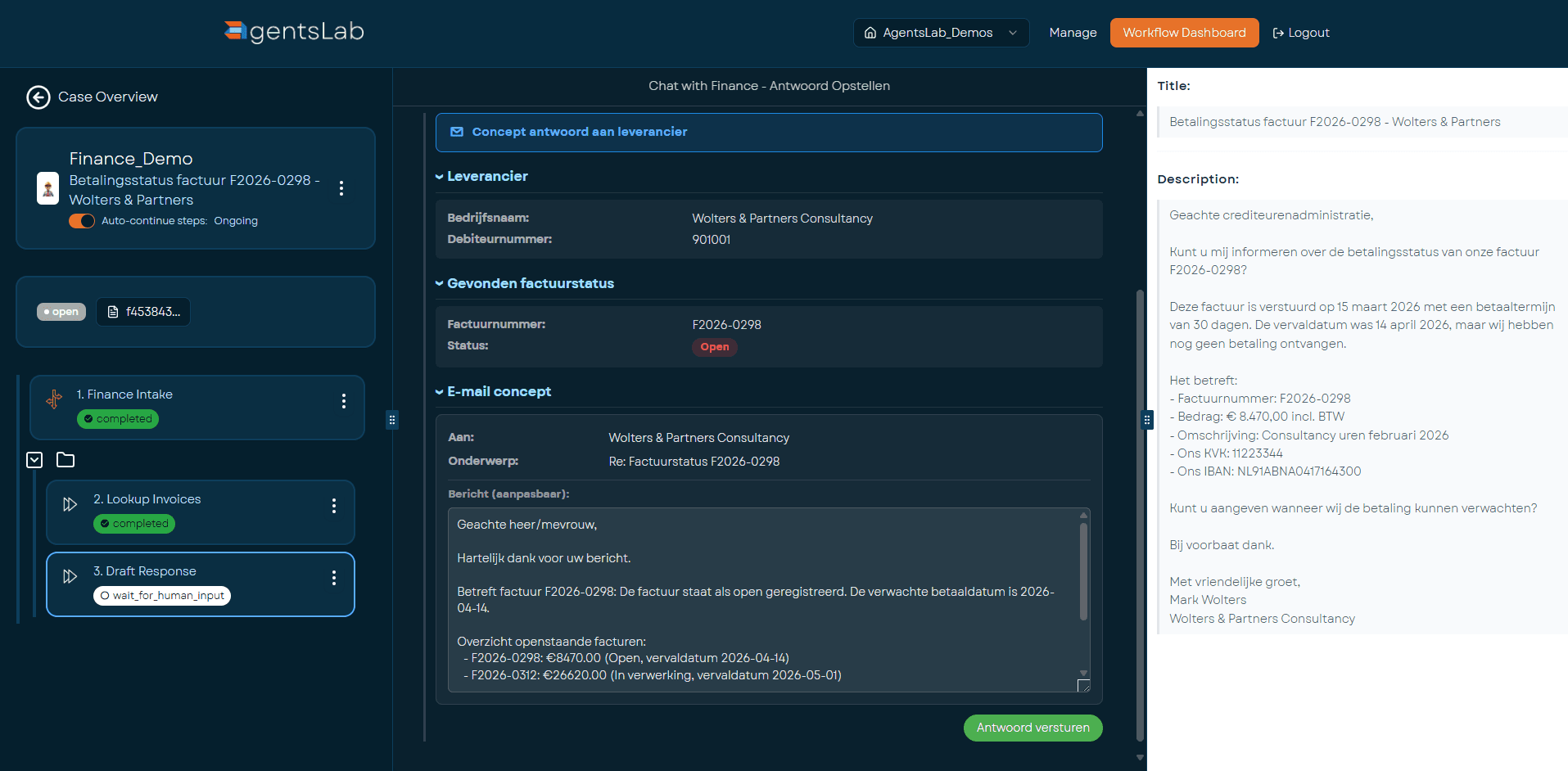
Case Details
This is where humans and AI genuinely collaborate. For every case you see: the original document, the extracted data, the validation result and the proposed ERP action. For exceptions, your team approves, corrects or redirects.
Review, approve, redirect
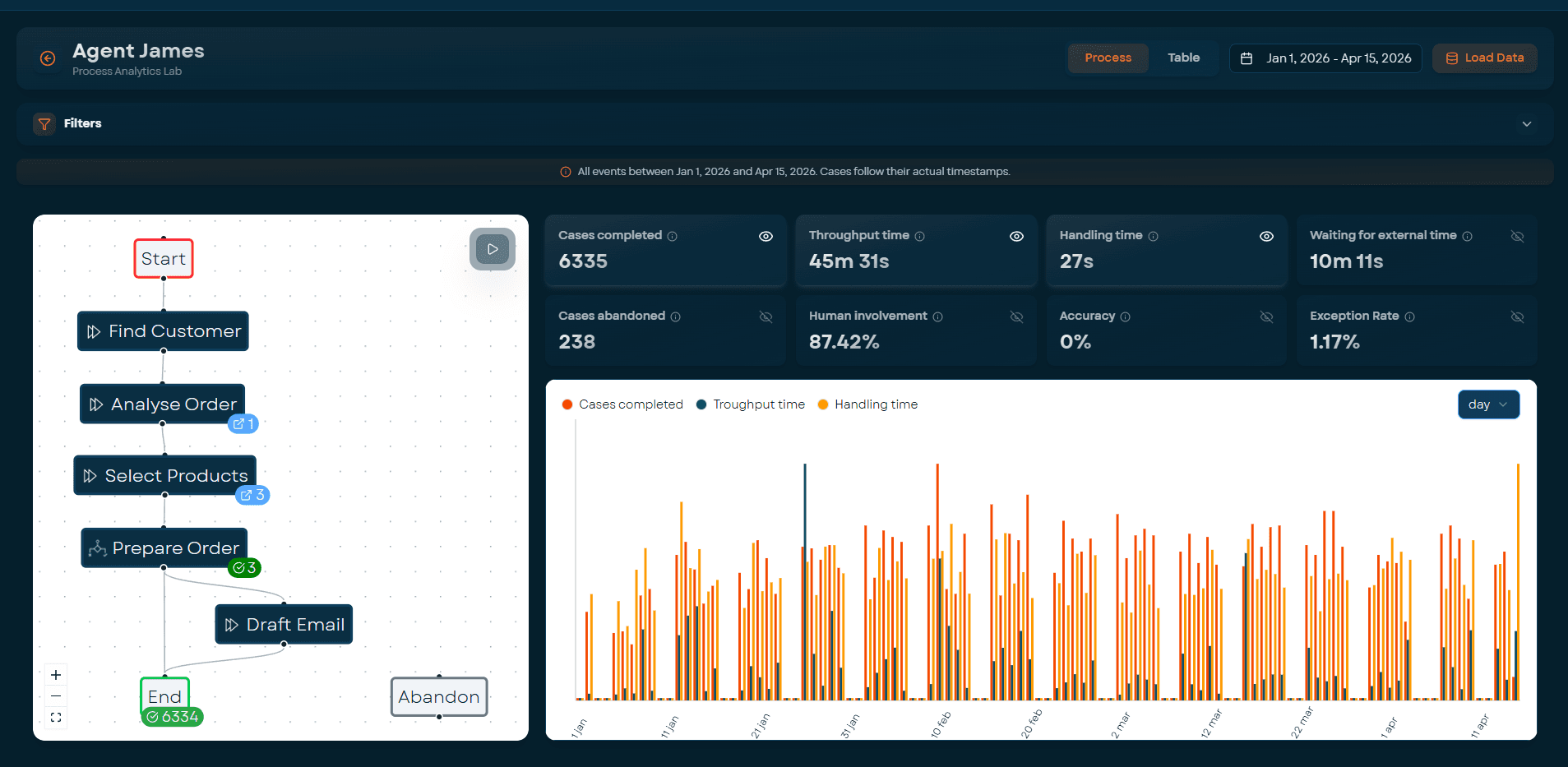
Process Analytics Lab
How does a process perform over time? Where are the bottlenecks? Lead times, volumes, exception rates and human involvement: all visible per step. If you can measure it, you can improve it.
Analyse and optimise
Processes
What we automate
Six process types we automate end-to-end. The AI coworker does the work; your team reviews exceptions and stays in control.
Order handling
Incoming customer orders via email, portal or EDI, validated against customer agreements, pricing and stock, created as sales orders in the ERP.
From 10+ min to <30 sec per order
Invoice processing
Incoming supplier invoices, matched against purchase orders, receipts and contracts, posted with the correct GL accounts, cost centres and VAT.
Three-way matching automated
Service ticket processing
Incoming service tickets from engineers or subcontractors, data extracted from PDFs and emails, registered with the correct project codes and cost allocations.
From 10 min to ~10 sec per service ticket
Document classification & routing
Mixed document streams (mailboxes with orders, invoices, complaints, correspondence), classified by type, routed to the correct process or person.
23+ document types recognised automatically
Quotes
Customer requests, matched against product catalogues and pricing rules, quotes generated in the ERP. Your sales team reviews and approves.
Automated quote generation
Claims & returns
Customer complaints or return requests, logged, classified by type and urgency, routed to the right handler with the relevant context.
End-to-end intake automation
Integrations
Connected to your ERP
No generic API connectors. We understand the data models, business logic and validation rules of each system, and align to your exact way of working.
SAP
The dominant ERP in the enterprise and upper mid-market. S/4HANA and ECC, on-premise or cloud. Integration via OData, BAPI and IDoc for finance, supply chain and order-to-cash.
AFAS Profit
The dominant ERP in the Dutch mid-market. We understand AFAS's data model, GetConnectors and UpdateConnectors. Integration for finance, order management and project accounting.
Exact Globe & Online
Widely used in wholesale, manufacturing and services. Both on-premise (Globe) and cloud (Online). Deep integration for orders, invoices and stock.
Microsoft Dynamics 365
Business Central and Finance & Operations. Order-to-cash and procure-to-pay processes for larger mid-market and enterprise.
Odoo
Open-source ERP, popular with scale-ups and international companies. Sales orders, procurement, invoicing and CRM workflows.
Bouwworks
Construction-specific ERP for installation and building companies. Service ticket processing, project administration and planning, including XML mail integration and GLN mapping.
Your system?
We keep expanding. If your organisation runs a different ERP, industry system or custom application, get in touch, we build new integrations on top of proven architecture.
Curious what this looks like for your process?
We start with a Quick Scan of ~1.5 hours. No commitments.
Book your go-live